Text on an arc, for real
Outside ⌒, read from above, or inside ⌣, read from below: drag it along the circle and it stays in the band.
Incisio lays out text and serial numbers on rings, flanges and plates, keeps them inside the work area and writes the G-code for your engraver. On your computer or right in the browser.
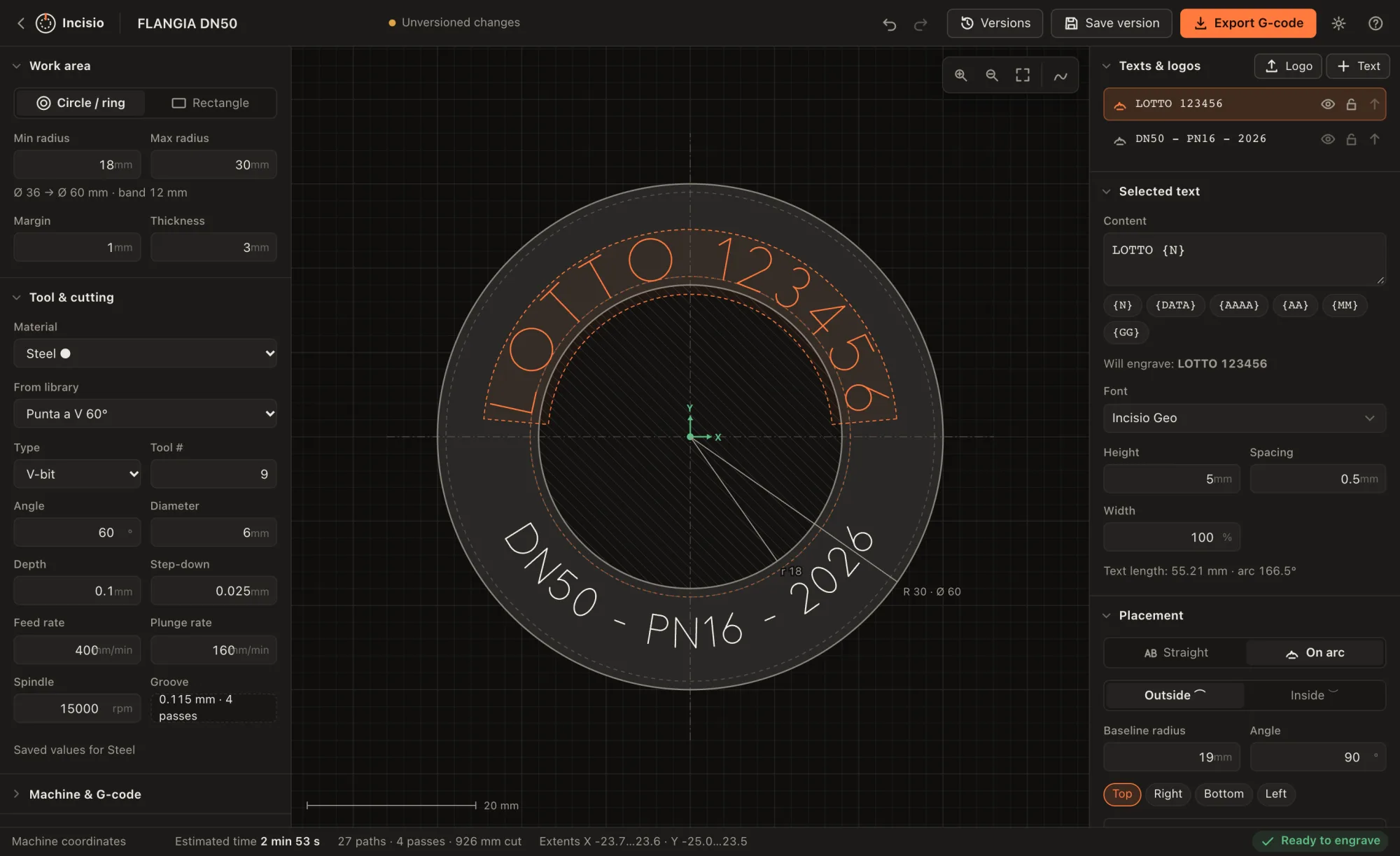
A band with min and max radius, a full disc or a rectangle; margin, dimensions and scale always in view.
V-bit, end mill, ball nose or diamond drag: groove and passes worked out, cutting data saved per material.
Drag it along the circle and across radii, with snapping every 45° and to the edges of the band.
On a line or on an arc, outside or inside, with exact radius and angle, and “Fit to ring”.
One file for your controller, or a batch in a .zip with one file per number.
Area
Ø 36 → Ø 60 mm12 mm band · 1 mm marginTexts
LOTTO {N}DN50 - PN16 - {AAAA}60° V-bit · Ø 6
0.1 mm in 4 passes0.115 mm grooveUCCNC · G2/G3 arcs · 524 lines
N200G00Z10.000
N210G00X-16.654Y9.146
N220G00Z2.000
N230G1Z-0.025F160.0
N240G3X-19.053Y7.858I-2.191J1.203F400.0
N250G3X-16.654Y9.146I0.208J2.491
N260G1Z-0.050F160.0
How it works
A circular band with min and max radius, a full disc or a rectangle. With margin and thickness, and the scale always in view.
On a line or on an arc, with the bundled single-line fonts. {N} for the serial number, {DATA} and {AAAA} for dates.
V-bit, end mill, ball nose or diamond drag. Depth is split into equal passes and the groove width is worked out.
For UCCNC, Mach3/4, LinuxCNC, GRBL or ISO/Fanuc, with G2/G3 arcs and a time estimate. In batches too, one file per number.
Hands-on demo
Two and a half minutes on a Ø 64 flange: work area, batch number on the arc, single-line fonts, tool, toolpath simulation, versions and export of a batch of G-code files.
The interface and captions in the video are in Italian; Incisio is also available in English, German, Spanish, French, Dutch and Portuguese.
What’s inside
Outside ⌒, read from above, or inside ⌣, read from below: drag it along the circle and it stays in the band.
{N} with leading zeros and a step, advancing by itself on every export. Or a .zip with one file per number.
One pass along the stroke, no doubled outlines. And your own TTF/OTF fonts, engraved along the outline.
Depth is split into equal passes; on open strokes the tool goes back and forth without lifting.
Curves become arcs within the tolerance you choose: shorter files and smoother motion.
If a text leaves the band you’re warned while you drag it, groove width included.
Each version says what changed, like “Text: LOTTO 004127 → LOTTO 004128”. Restoring never deletes anything.
Import a drawing and engrave its outline, on an arc too, rotated, scaled or mirrored.
An app for Mac, Windows and Linux that works without a connection, or the browser on PCs and tablets. Your projects stay on your device.
Bundled fonts
In a single-line font every letter is a line, not an outline: the tool follows it once. Here are a few, drawn from the same data Incisio uses.
and 11 more: 19 in all, plus any TTF/OTF you import
The Hershey fonts were originally created by Dr. A. V. Hershey at the U.S. National Bureau of Standards; the data format is by James Hurt, Cognition Inc. The EMS fonts are distributed under the SIL Open Font License 1.1.
Where it comes from
Born from a real job.
Incisio started on the shop floor: a lot number to engrave on a circular band, different every time, without redrawing it in a CAD/CAM package built for something else entirely.
The G-code of that job was taken apart and reproduced: same structure, same tool, same passes. Everything else grew from there: arcs, batches, versions, and whatever someone who engraves text every day needs.
Limits, stated plainly
Single-line fonts follow the stroke, TTF fonts and logos the outline. No filling or pocketing.
Every stroke at the same depth, in equal passes: no variable-depth V-carving.
Incisio writes the G-code file; you load it into your controller as usual.
Projects stay on the device where you create them, not in an online store: make backups (the app reminds you after 30 days).
FAQ
No. Your projects stay on your device, not on a server, and the app for Mac, Windows and Linux works without internet.
There are post-processors for UCCNC, Mach3/4, LinuxCNC, GRBL and ISO/Fanuc, and you can define your own. Work zero at the centre or a corner, with an X/Y offset.
Yes: besides the app for Mac, Windows and Linux, Incisio will run in the browser, on PCs and tablets, in recent Chrome, Edge or Firefox.
The file is ready for the controller, but before a real part try it in the controller’s simulation and on a scrap piece, checking work zero and Z height.
Italian, English, German, Spanish, French, Dutch and Portuguese, with a light and a dark theme.
Get started
We’re preparing the first public version: you’ll be able to download it for Mac, Windows and Linux, and use it in the browser on PCs and tablets too. Check back: it will appear here.
Desktop app, works offline
Desktop app, works offline
Desktop app, works offline
On PCs and tablets, nothing to install
Recent Chrome, Edge or Firefox. Projects stay in the browser of the device you use.